# Cornerstone Help Center

#### Presets

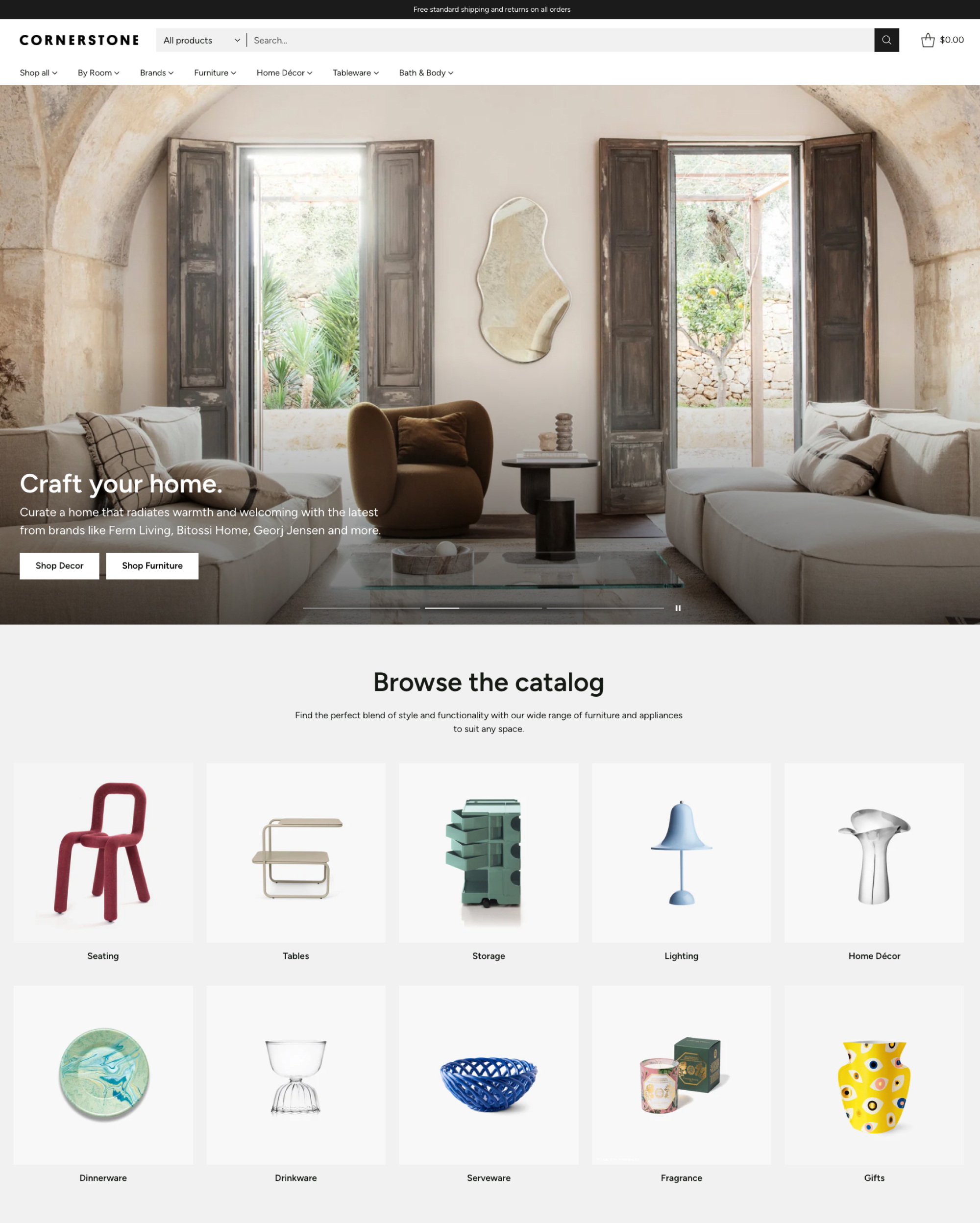
Cornerstone has 5 ready-made presets with demo styles and layouts. All presets have the same features to customize your store just the way you want.

<div><figure><img src="https://475958657-files.gitbook.io/~/files/v0/b/gitbook-x-prod.appspot.com/o/spaces%2Fyt3Wwaqhge0XvrXmVj7D%2Fuploads%2FBl17WDonyNcyGCqh9OyB%2FCornerstone-Flair-Desktop.jpg?alt=media&#x26;token=b0de3bdb-7250-4d7d-a735-0366b76f769a" alt=""><figcaption><p><a href="https://themes.shopify.com/themes/cornerstone/presets/cornerstone">Cornerstone</a></p></figcaption></figure> <figure><img src="https://475958657-files.gitbook.io/~/files/v0/b/gitbook-x-prod.appspot.com/o/spaces%2Fyt3Wwaqhge0XvrXmVj7D%2Fuploads%2FBSjQk6WIXFRcVeuOmmiu%2FCornerstone-Barista-Desktop.jpg?alt=media&#x26;token=3ab9606c-9ca5-4750-b1dc-7ba4105e6d33" alt=""><figcaption><p><a href="https://themes.shopify.com/themes/cornerstone/presets/barista">Barista</a></p></figcaption></figure> <figure><img src="https://475958657-files.gitbook.io/~/files/v0/b/gitbook-x-prod.appspot.com/o/spaces%2Fyt3Wwaqhge0XvrXmVj7D%2Fuploads%2Fz0SW5dNpr8XayuLepAjM%2FCornerstone-Glow-Desktop.jpg?alt=media&#x26;token=df47cc59-dac5-451c-bb32-5042f12adde4" alt=""><figcaption><p><a href="https://themes.shopify.com/themes/cornerstone/presets/glow">Glow</a></p></figcaption></figure> <figure><img src="https://475958657-files.gitbook.io/~/files/v0/b/gitbook-x-prod.appspot.com/o/spaces%2Fyt3Wwaqhge0XvrXmVj7D%2Fuploads%2F6pE1N5ekokwlRfx0XBLl%2FCornerstone-Botanical-Desktop.jpg?alt=media&#x26;token=c96d55d0-b12f-4e19-be5f-51ad48af1549" alt=""><figcaption><p><a href="https://themes.shopify.com/themes/cornerstone/presets/botanical">Botanical</a></p></figcaption></figure> <figure><img src="https://475958657-files.gitbook.io/~/files/v0/b/gitbook-x-prod.appspot.com/o/spaces%2Fyt3Wwaqhge0XvrXmVj7D%2Fuploads%2Fc5eHWmZtUrLgIai5rlZw%2FCornerstone-Origami-Desktop.jpg?alt=media&#x26;token=4600f182-3257-4f85-979e-ccfa1044940c" alt=""><figcaption><p><a href="https://themes.shopify.com/themes/cornerstone/presets/origami">Origami</a></p></figcaption></figure></div>

#### Guides

<table data-card-size="large" data-view="cards"><thead><tr><th></th><th data-hidden></th><th data-hidden></th><th data-hidden data-type="content-ref"></th></tr></thead><tbody><tr><td><mark style="color:blue;"><strong>Install Cornerstone</strong></mark></td><td></td><td></td><td><a href="readme/start-your-free-trial">start-your-free-trial</a></td></tr><tr><td><mark style="color:blue;"><strong>Migrate to Cornerstone</strong></mark></td><td></td><td></td><td><a href="readme/start-your-free-trial/migrate-your-theme">migrate-your-theme</a></td></tr></tbody></table>

<table data-view="cards"><thead><tr><th></th><th></th><th data-hidden></th><th data-hidden data-type="content-ref"></th></tr></thead><tbody><tr><td><mark style="color:blue;"><strong>Edit theme styles</strong></mark></td><td>Customize your store’s site-wide styles and options.</td><td></td><td><a href="theme-styles/theme-settings">theme-settings</a></td></tr><tr><td><mark style="color:blue;"><strong>Use page templates</strong></mark></td><td>Edit default page templates or create custom pages.</td><td></td><td><a href="pages/templates">templates</a></td></tr><tr><td><mark style="color:blue;"><strong>Add sections and blocks</strong></mark></td><td>Design templates with sections and blocks.</td><td></td><td><a href="pages/theme-sections">theme-sections</a></td></tr></tbody></table>

{% hint style="info" %}
**New to Shopify?** See our [introduction to editing themes](https://help.fluorescent.co/cornerstone/general/editing-themes).
{% endhint %}

{% columns %}
{% column %}

{% endcolumn %}

{% column %}

{% endcolumn %}
{% endcolumns %}

#### Frequently asked questions

[See all FAQs →](https://help.fluorescent.co/cornerstone/readme/faqs)

<details>

<summary>Why aren't changes in the editor showing on my site?</summary>

You may need to assign the template you are editing to your pages in the Shopify admin. See our [guide for creating and assigning templates](https://help.fluorescent.co/cornerstone/general/editing-themes/using-templates#create-and-assign-multiple-templates). If your theme isn't published yet, learn how to [assign templates from unpublished themes](https://help.fluorescent.co/cornerstone/general/editing-themes/using-templates#assign-templates-from-unpublished-theme).

It's also possible you have edited a 'Context' for a specific market, so the changes will only appear when visiting your site from certain countries. See our guide for [Editing contexts for markets](https://help.fluorescent.co/cornerstone/general/adapting-your-theme/unique-content-for-markets#editing-contexts).

</details>

<details>

<summary>How do I find the H1 heading tags?</summary>

H1 headings are generated from page titles or the store name, following Shopify's recommended SEO structure. Page titles can be edited in your Shopify admin.

If you have concerns about H1 tags in your theme, see our [H1 heading tags guide](https://help.fluorescent.co/cornerstone/general/editing-themes/h1-heading-tags) for answers to common questions.

</details>

<details>

<summary>Does Cornerstone support multiple languages?</summary>

Yes. Cornerstone includes a language selector in the [Announcement bar](https://help.fluorescent.co/cornerstone/header/announcement-bar#language-selector) and [Footer](https://help.fluorescent.co/cornerstone/footer/footer#language-selector). You will need to use an app (like Shopify’s [Translate & Adapt](https://apps.shopify.com/translate-and-adapt)) to translate your store content, and you may need to take some extra steps when setting up theme features. Learn more in our guide for [selling in multiple languages](https://help.fluorescent.co/cornerstone/general/adapting-your-theme/multiple-languages).

</details>

<details>

<summary>Why are my swatches blank?</summary>

If your swatches appear blank, make sure that you are using an [existing default color](https://help.fluorescent.co/cornerstone/product-pages/variant-options/variant-swatches/use-default-colors) or that your [image files](https://help.fluorescent.co/cornerstone/product-pages/variant-options/variant-swatches/use-custom-images) and [custom color names](https://help.fluorescent.co/cornerstone/product-pages/variant-options/variant-swatches/use-custom-colors) much your variant names. You may also need to [add custom swatches for multiple languages](https://help.fluorescent.co/cornerstone/product-pages/variant-options/variant-swatches/use-custom-colors#add-custom-colors).

</details>

<details>

<summary>How do I set up mega navigations?</summary>

Cornerstone has 5 types of mega navigations. See the full [mega navigation guide](https://help.fluorescent.co/cornerstone/header/header/mega-navigation) to learn more.

</details>

<details>

<summary>How do I remove the ‘Shipping’ and ‘Taxes’ messages?</summary>

Depending your store settings, default text for Shipping and Taxes appears on Cart and Product pages. Follow our guide for [Editing default theme content](https://help.fluorescent.co/cornerstone/general/adapting-your-theme/edit-default-theme-content) to change or remove this text.

</details>

<details>

<summary>Will you help customize my store?</summary>

While our Support cannot offer code customizations, we can point you to a service that does. Just let us know what you're looking for — we might even have a solution for you with our available theme features.

</details>

<details>

<summary>Do you provide refunds?</summary>

All theme sales are final and we are unable to provide refunds. As theme developers, we are not involved in billing or transactions through the Shopify theme store. Refund request need to be addressed to [Shopify’s billing team](https://help.shopify.com/en/support/support-type).

</details>

## Theme version

We consistently update our theme with fixes and improvements, and we would love to hear your input on how we can make Cornerstone even better.

<table data-view="cards"><thead><tr><th></th><th></th><th data-hidden></th><th data-hidden data-card-target data-type="content-ref"></th></tr></thead><tbody><tr><td><a href="readme/changelog">Changelog</a></td><td>Find release notes for the latest versions.</td><td></td><td><a href="readme/changelog">changelog</a></td></tr><tr><td><a href="general/theme-updates">Theme updates</a></td><td>Learn how to update your theme version.</td><td></td><td><a href="general/theme-updates">theme-updates</a></td></tr><tr><td><a href="https://cornerstone-theme.nolt.io/">Feature requests</a></td><td>View and add requests for future theme development.</td><td></td><td><a href="https://cornerstone-theme.nolt.io/">https://cornerstone-theme.nolt.io/</a></td></tr></tbody></table>

## Contact us

Our support team is here to answer any questions and address issues arising from general use of the theme. We're available **Monday to Friday, 10AM to 6PM PST**, excluding statutory holidays.

<table data-view="cards"><thead><tr><th data-card-target data-type="content-ref"></th><th data-hidden></th><th data-hidden></th><th data-hidden></th></tr></thead><tbody><tr><td><a href="support/support-policy">support-policy</a></td><td></td><td></td><td></td></tr><tr><td><a href="support/shopify-vs-theme-issues">shopify-vs-theme-issues</a></td><td><a href="support/shopify-vs-theme-issues">Troubleshooting</a></td><td></td><td></td></tr><tr><td><a href="support/store-access-requests">store-access-requests</a></td><td><a href="support/store-access-requests">Store access requests</a></td><td></td><td></td></tr></tbody></table>

<table data-card-size="large" data-view="cards"><thead><tr><th></th><th data-hidden></th><th data-hidden data-type="content-ref"></th><th data-hidden data-card-cover data-type="files"></th></tr></thead><tbody><tr><td><img src="https://475958657-files.gitbook.io/~/files/v0/b/gitbook-x-prod.appspot.com/o/spaces%2Fyt3Wwaqhge0XvrXmVj7D%2Fuploads%2FY7XLS4n7HD5rvYnWKiR0%2Fflst-logo-280.png?alt=media&#x26;token=053e3152-c2bf-499e-ba09-0d4110db835e" alt="" data-size="line"> <a href="https://fluorescent.co/contact"><strong>Contact us</strong></a></td><td></td><td><a href="https://fluorescent.co/contact">https://fluorescent.co/contact</a></td><td></td></tr></tbody></table>
